Assignment statements
Once you have a variable, you can use it to store a value and then change that value over time. Use an assignment statement to store a value in the variable. The variable will retain that value until you use another assignment statement to change it.
The basic form of the assignment statement has the name of the variable to change, an = and then the value to store. There are also several shorthand methods for changing the value:
a = b;will store the valuebin the variablea.a += b;will store the valuea + bin the variablea. With similar options for-=,*=, and/=.a++;will store the valuea + 1in the variablea. Can also be written as++a;.
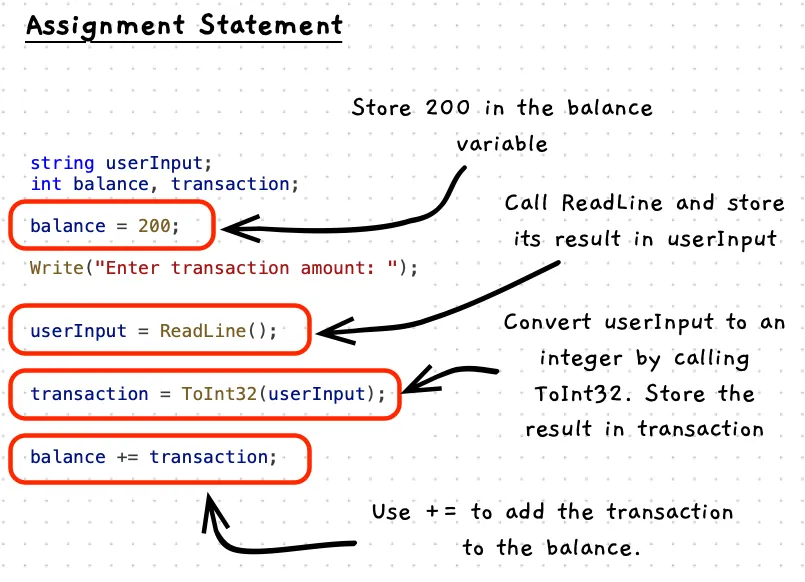
Example
This code includes some assignment statements that store values in the name, userInput, balance, and transaction variables.
using static SplashKitSDK.SplashKit;using static System.Convert;
string name, userInput;int balance;int transaction;
Write("Please enter your name: ");name = ReadLine();
Write("Enter initial balance: ");userInput = ReadLine();balance = ToInt32(userInput);
Write("Enter transaction amount: ");userInput = ReadLine();transaction = ToInt32(userInput);
balance += transaction;
WriteLine($"{name}, the new balance is now: {balance}");
Activities
What will the following do?
age = 21;name = ReadLine();interestPayment = balance * rate;age = age + 1;age += 1;age++;
Answers
- 1: Stores 21 in the
agevariable. - 2: Calls
ReadLineand stores the result in thenamevariable. - 3: Calculates
balance * rateand stores the result ininterestPayment. - 4: Reads the current value of
age, adds one to it, and stores the result back intoage. - 5: This is the same as 4.
- 6: This is the same as 4.